PICSHIK / PROMPT STUDIO

Free Passport Photo Images & AI Prompts

Browse and download free passport photo AI images and pictures. Copy the full image generator prompts, view model and aspect ratio settings, or create your own in Picshik.

2 images with English prompts · Free image downloads and prompt copies · No sign-in needed

Find your next image

2 prompts

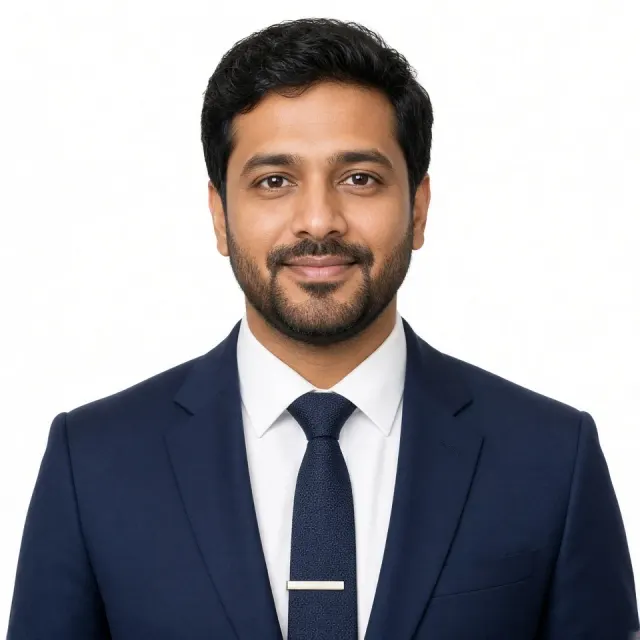
Navy Suit Corporate Headshot AI Prompt Generated with Grok
Business & Professional 1:1 · Try Grok

Navy Suit Corporate Headshot AI Prompt

Business & Professional · Corporate Headshots · Executive Portraits · LinkedIn Profile Picture

Create

Use the uploaded photo only as the strict facial identity reference. Preserve the exact recognizable face, facial proportions, skin tone, hairstyle and hairline, beard pattern if present, eye shape, nose, lips, jawline, and natural features. Do not beautify, reshape, de-age, or alter the identity. Create a hyper-realistic professional corporate headshot framed from the upper chest upward. Position the subject perfectly centered, facing directly toward the camera, with the head straight, shoulders level, and posture upright. Use a calm, approachable expression with a very subtle natural smile. Dress the subject in a tailored dark navy business suit, crisp white dress shirt, and textured navy tie with a simple silver tie clip. Use a clean, seamless pure white background with no distractions. Use soft, even professional studio lighting from the front with gentle fill light, natural skin tones, subtle facial dimension, minimal shadows, and realistic skin texture. Keep facial details extremely sharp and zoom-safe. Use an eye-level camera with an 85mm portrait lens and natural perspective. Create a symmetrical, passport-style composition with a premium LinkedIn and executive portrait aesthetic. Photorealistic, highly detailed, with natural skin texture. Avoid plastic-looking skin, excessive retouching, harsh shadows, distorted facial features, text, logos, or watermarks.
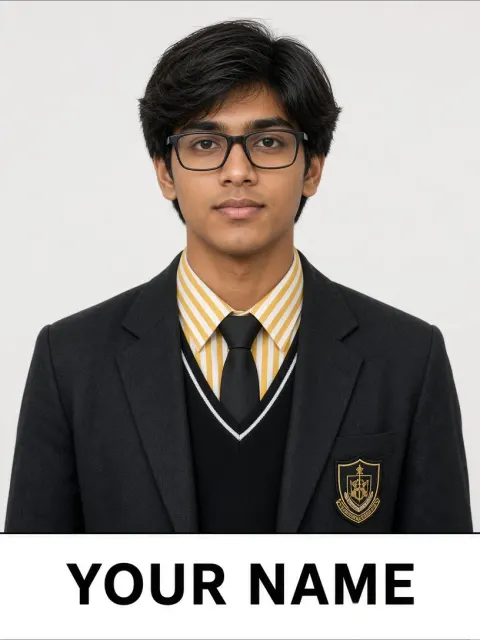
Realistic School ID Card Photo AI Prompt Generated with Grok
Professional Headshot 3:4 · Try Grok

Realistic School ID Card Photo AI Prompt

Professional Headshot · ChatGPT · Passport Photo

Create

Create a realistic vertical school ID-card portrait using the uploaded face as the strict identity reference. Preserve the exact facial structure, face shape, eyes, eyebrows, nose, lips, skin tone, age, and natural proportions. Do not beautify, de-age, or alter the identity. Show the subject centered and straight-on, framed from mid-chest upward, looking directly into the camera with a calm, confident, slightly cool expression. Keep the hairstyle neat but natural, with soft layered hair framing the face. Add large black rectangular eyeglasses similar to the reference. Outfit: a formal black school blazer, black V-neck sweater vest with thin white trim, a yellow-and-white striped collared shirt, and a plain black necktie. Add a small, realistic school-style embroidered badge to the blazer. Use a clean light gray or off-white studio background that is completely uncluttered. Apply soft, even ID-photo lighting with realistic skin texture, sharp eyes, individual hair strands, and crisp fabric details. The composition should resemble a premium school yearbook or student ID photograph: symmetrical framing, centered head, visible shoulders, minimal headroom, and a thin black rectangular border surrounding the portrait. At the bottom, add a separate clean white or light-gray name strip with exactly this lettering: “YOUR NAME” in bold black uppercase sans-serif typography, centered, correctly spelled, and clearly readable. Photorealistic, natural proportions, sharp facial detail, and a clean professional ID-photo finish. No glamour makeup, dramatic fashion posing, cartoon or anime styling, extra text, or watermark.