PICSHIK / PROMPT STUDIO

Free Photo Transformation Images & AI Prompts

Browse and download free photo transformation AI images and pictures. Copy the full image generator prompts, view model and aspect ratio settings, or create your own in Picshik.

2 images with English prompts · Free image downloads and prompt copies · No sign-in needed

Find your next image

2 prompts

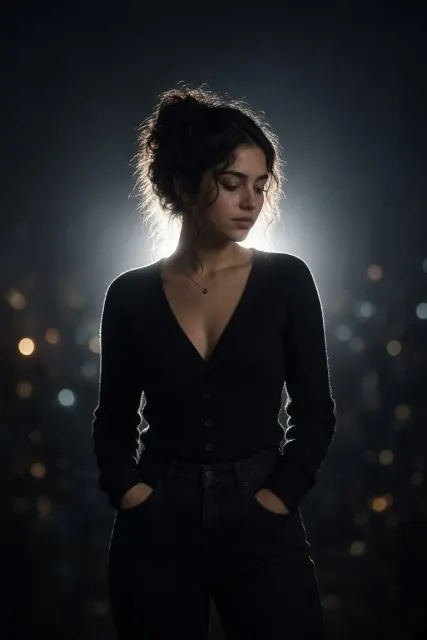
Cinematic Night Glow Restyle Generated with Grok
AI Photo Editing 2:3 · Try Grok

Cinematic Night Glow Restyle

AI Photo Editing · Cinematic Photography · Editing · Night Photography

Create

Use the uploaded image as the main base image. Preserve the subject’s original pose, framing, composition, camera angle, crop, body position, hand placement, facial identity, hairstyle, clothing, accessories, and overall subject details. Do not change the pose or expression. Only transform the lighting, background mood, and atmosphere. Convert the scene into a dark, moody nighttime portrait with a deep muted background fading into near-black shadows. Replace the original background with a soft, out-of-focus night environment featuring faint silhouettes, subtle bokeh lights, and cinematic dusk-to-night tones. Add a strong backlight directly behind the subject to create a bright white rim light around the hair, shoulders, arms, hands, clothing edges, and full body outline. Add a soft luminous bloom aura around the subject, especially along the outer edges, creating a dreamy glowing silhouette effect. The glow should feel natural, atmospheric, and cinematic rather than artificial or neon. Keep the subject clearly visible while allowing the background to remain dark and subdued. Maintain realistic skin texture, clothing texture, and natural facial features. Create the look of an ultra-realistic editorial night portrait captured with an 85mm DSLR lens, soft flash diffusion, shallow depth of field, subtle halation, bloom glow, gentle flash-lit contrast, and a dreamy low-light atmosphere. Use cinematic rim light, a glowing body aura, dreamy silhouette glow, a moody night portrait aesthetic, a dusk bokeh background, a CCD camera aesthetic, disposable-flash mood, and Instagram lo-fi night tones. Avoid changing the subject’s identity, pose, expression, framing, or proportions.
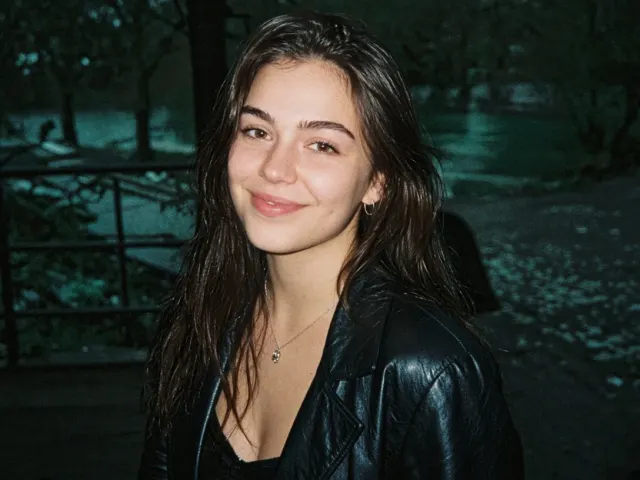
Instagram Flash Restyle Generated with Grok
AI Photo Editing 4:3 · Try Grok

Instagram Flash Restyle

AI Photo Editing · Digital Portrait · Viral · Woman

Create

Apply only an Instagram Flash filter-style effect to the uploaded image. Do not regenerate, redesign, crop, reframe, beautify, retouch, or change any content. Preserve the exact same person, face, expression, pose, outfit, hairstyle, objects, background, framing, and composition. Change only the filter treatment: night conversion, direct flash behavior, color grading, visible noise, and film grain. Convert the image into a darker, night-like low-light version of the same scene. Make the environment cooler, moodier, and richer, with a strong green-cyan/teal ambience and deeper night density, while keeping the original scene recognizable. The background should become darker and cooler than the subject without becoming muddy or fully black. Light the subject with a strong, clearly visible direct on-camera frontal flash. The flash should dominate the subject more than the ambient light. The face, skin, hair, and clothing facing the camera should appear brighter, flatter, more directly flash-lit, and slightly lifted in exposure. The subject should look more illuminated and separated from the surroundings, like a real camera-flash snapshot rather than a softly relit portrait. Keep the skin warm, bright, glowing, and flash-washed while the surroundings remain cooler and darker. If reflective, glossy, metallic, leather, glass, polished, or shiny surfaces are present, show realistic small flash reflections and specular pops where appropriate. If the scene geometry naturally allows it, include a believable subtle hard-edged flash shadow behind the subject or nearby objects, only where it would occur naturally. Match the overall look of a rich Instagram Flash-style photo: a stronger night mood, cooler green-cyan ambience, a brighter flash-lit subject, slightly punchier contrast, and a clearly filtered appearance. Add visible digital noise and fine 35mm color-negative film grain across the entire image, especially in darker areas, smooth surfaces, and the background. If the original image already contains noise or compression texture, do not clean it up; blend it naturally into the overall grain structure. The final result should look like the same original photo captured at night with a strong direct camera flash, featuring richer green-cyan ambience, a more obviously flash-lit subject, visible film grain, visible noise, and an Instagram Flash-style treatment. Avoid soft studio lighting, weak subject flash, polished portrait lighting, aggressive denoising, overly neutral colors, dull flat skin, muddy blacks, or any change to the image content.