PICSHIK / PROMPT STUDIO

Free Editing Images & AI Prompts

Browse and download free editing AI images and pictures. Copy the full image generator prompts, view model and aspect ratio settings, or create your own in Picshik.

2 images with English prompts · Free image downloads and prompt copies · No sign-in needed

Find your next image

2 prompts

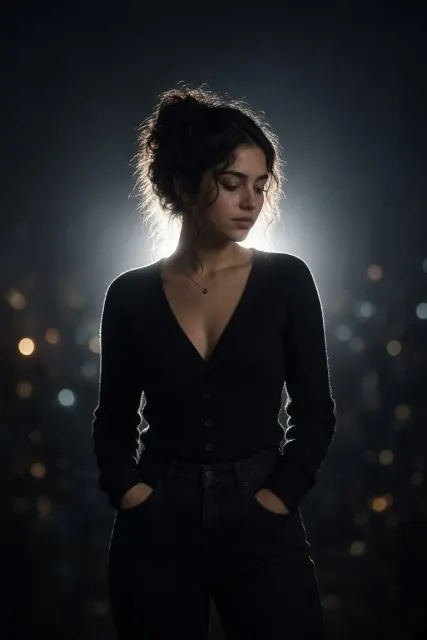
Cinematic Night Glow Restyle Generated with Grok
AI Photo Editing 2:3 · Try Grok

Cinematic Night Glow Restyle

AI Photo Editing · Cinematic Photography · Editing · Night Photography

Create

Use the uploaded image as the main base image. Preserve the subject’s original pose, framing, composition, camera angle, crop, body position, hand placement, facial identity, hairstyle, clothing, accessories, and overall subject details. Do not change the pose or expression. Only transform the lighting, background mood, and atmosphere. Convert the scene into a dark, moody nighttime portrait with a deep muted background fading into near-black shadows. Replace the original background with a soft, out-of-focus night environment featuring faint silhouettes, subtle bokeh lights, and cinematic dusk-to-night tones. Add a strong backlight directly behind the subject to create a bright white rim light around the hair, shoulders, arms, hands, clothing edges, and full body outline. Add a soft luminous bloom aura around the subject, especially along the outer edges, creating a dreamy glowing silhouette effect. The glow should feel natural, atmospheric, and cinematic rather than artificial or neon. Keep the subject clearly visible while allowing the background to remain dark and subdued. Maintain realistic skin texture, clothing texture, and natural facial features. Create the look of an ultra-realistic editorial night portrait captured with an 85mm DSLR lens, soft flash diffusion, shallow depth of field, subtle halation, bloom glow, gentle flash-lit contrast, and a dreamy low-light atmosphere. Use cinematic rim light, a glowing body aura, dreamy silhouette glow, a moody night portrait aesthetic, a dusk bokeh background, a CCD camera aesthetic, disposable-flash mood, and Instagram lo-fi night tones. Avoid changing the subject’s identity, pose, expression, framing, or proportions.
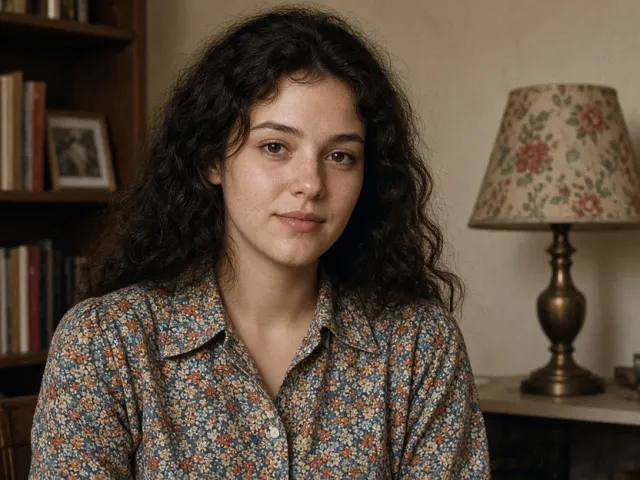
Old Photo Restoration Generated with Grok
AI Photo Editing 4:3 · Try Grok

Old Photo Restoration

AI Photo Editing · Editing · Old Photo Restoration · Photo Enhancement

Create

Restore the source photograph while strictly preserving facial geometry, body proportions, identity, original aspect ratio, framing, semantic positioning, and all existing objects. Target identity similarity ≥ 0.95. Reconstruct natural macro epidermal texture, visible skin pores, textile weaves, and era-specific surface details; avoid "plastic" smoothing. First assess whether the source is real, synthetic, or ambiguous, and estimate overall damage on a 0–100 scale with regional confidence (RC). For RC ≥ 70, use context-guided high-detail reconstruction. For RC 30–69, perform coarse-to-medium structural restoration with zero semantic invention. For RC < 30, use only era-consistent silhouette and texture filling. Apply area-based reconstruction constraints: under 10% damage uses guided inpainting, 10–40% uses structural geometry synthesis, and over 40% uses a texture-only pass. Never invent, remove, or alter meaningful objects or identifying marks. Maintain rigorous vanishing-point alignment, scale, geometric continuity, and physical plausibility. Validate reconstructed areas against surrounding geometry and revert to "Safe Fill" if the physics check fails. Restore chiaroscuro-level lighting depth while preserving the original shadow direction and luminance gradients. Reconstruct physically accurate material reflectance, including appropriate specular highlights and matte finishes. Recover faded colors with an era-appropriate palette and controlled HDR tonal range, retaining vintage warmth, analog character, and spectral color fidelity. Apply sub-pixel deconvolution, motion-blur neutralization, chromatic-aberration correction, and multi-stage 4x-or-greater super-resolution with anti-artifact refinement. Separate sensor noise from compression artifacts, remove degradational "noise.", and preserve the original analog grain structure. Preserve metadata and EXIF information when possible. Intended output: lossless 16-bit PNG or TIFF in archival and sRGB color spaces, with no watermarks, logos, or altered identifying marks.